
CV Mail Mantra: The Smart Outlook Add-In That Prevents Email Mistakes Before They Happen
We all move fast at work. Emails go out every minute. Attachments, client details, financial sheets… everything flows through Outlook. And in that rush, it’s easy to miss a small mistake — a wrong recipient, a sensitive file, or a private message going outside the company.
One tiny slip can turn into a big problem: data leaks, compliance issues, or an email you wish you could take back.
This is the exact problem CV Mail Mantra solves.
Built for organizations that rely on Microsoft Outlook, CV Mail Mantra acts like a smart safety layer that quietly watches email activity and alerts employees before they make a mistake. It’s simple, fast, and blends into everyday work — no extra steps, no complicated tools.
If your business wants a safer email culture, fewer accidental leaks, and smarter workflows, this solution is worth knowing.
What Is CV Mail Mantra? (Simple Answer First)
CV Mail Mantra is an intelligent Outlook add-in that prevents accidental data leaks by alerting users when emails contain sensitive content, risky recipients, or flagged keywords.
It helps organizations send emails more carefully, more confidently, and more securely.
How it helps:
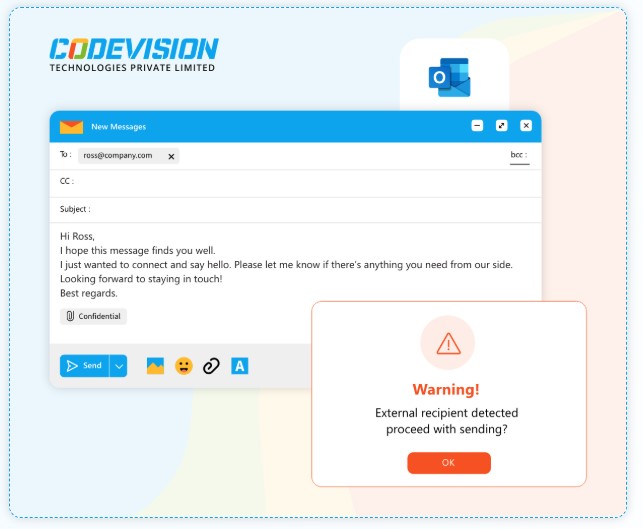
- Warns users when sending emails to external domains
- Detects sensitive keywords and attachment names
- Reduces human error before the email leaves Outlook
- Creates a safer communication environment across the company
Think of it as a friendly assistant. A second pair of eyes. A reminder that shows up at the perfect time.
Why Do Companies Need Smart Email Alerts Today?
Every organization faces similar risks:
- Employees accidentally email the wrong person
- Internal documents get shared outside
- Sensitive attachments leave the company
- New staff forget data policies
- High-volume workers click send without reviewing
According to industry surveys, more than 80% of data leaks happen because of human error, not hackers.
And most of these errors happen through emails.
A tool like CV Mail Mantra reduces this risk at the source — before the email goes out.
What Makes CV Mail Mantra Different?
Here’s where the tool shines. It doesn’t try to overwhelm users. Instead, it fits quietly into Outlook and pops up only when needed.
Below are the core benefits written in a simple, real-world way.
1. Smart Alerts for External Email Recipients
Benefit: Stops accidental sharing with outsiders
Feature: Detects non-corporate domains
Outcome: Employees think twice before sending confidential info
Example:
Imagine writing to “Alex@company.com” but Outlook autocompletes “Alex@gmail.com.”
CV Mail Mantra spots this and shows a quick alert:
“You’re sending this to an external address. Please review.”
That small nudge prevents major loss.
2. Attachment Filename Scanning
Many mistakes happen when the wrong file gets attached — like a “salary-2025.xlsx” or “client-contract-draft.docx.”
CV Mail Mantra scans filenames for sensitive phrases and gives a warning.
This saves embarrassment… and often, money.
3. Keyword-Based Data Protection
You can set custom keywords such as:
- confidential
- financial
- contract
- personal data
- salary
- legal draft
When the tool detects these words inside email content, it alerts the sender.
This gives HR, Finance, Legal, and Sales a safer environment instantly.
4. Custom Rules Tailored to Your Company
No two businesses work the same way.
So CV Mail Mantra lets admins create custom rules:
- Domain rules
- Keyword rules
- Attachment rules
- Alert messages
- Blocking or warning preferences
This flexibility makes the add-in adapt to any industry — IT, consulting, HR, banking, legal, healthcare, and more.
5. Smooth Outlook Integration
No new software windows.
No switching tabs.
Everything works inside Outlook.
That means employees don’t need special training. They just send emails like usual, and the tool does the watching for them.
How Does CV Mail Mantra Improve Data Security?
Here is a clear, practical flow:
Step 1: User prepares an email
The add-in silently monitors recipients, subject lines, and attachments.
Step 2: Something risky is detected
It could be:
- Sensitive keywords
- A personal email address
- A risky file name
Step 3: A helpful warning appears
Not a block. Not a popup nightmare.
Just a clean message reminding the user to double-check.
Step 4: User reviews and confirms
This pause helps prevent more than 90% of accidental leaks.
Comparison Table: CV Mail Mantra vs. Traditional Email Policies
| Feature / Protection Area | CV Mail Mantra | Traditional Email Policies |
| Real-time alerts | ✔ Yes | ✘ No |
| Checks external recipients | ✔ Yes | ✘ Depends on user |
| Keyword-based scanning | ✔ Yes | ✘ Not possible |
| Attachment name scanning | ✔ Yes | ✘ No |
| User-friendly | ✔ Very | ✘ Often ignored |
| Prevents human mistakes | ✔ High accuracy | ✘ Low accuracy |
| Training required | Minimal | High |
This shows why automated protection is far more reliable than expecting employees to remember everything.
Real Example: How CV Mail Mantra Helps in Daily Work
Let’s imagine a real scenario.
Riya from HR is emailing offer letters to new hires.
She attaches the file “offer-letter-Rahul.pdf.”
Outlook also shows another file with similar name:
“salary-details-Rahul.xlsx.”
She selects both by mistake.
Before she hits send, CV Mail Mantra opens a warning:
“This email contains an attachment related to salary. Please review before sending externally.”
She checks, removes the sensitive file, and sends the correct one.
A problem avoided.
A risk removed.
A simple moment saved the day.
Who Should Use CV Mail Mantra?
This tool is ideal for:
- HR and recruitment teams
- Finance departments
- Sales and business development
- Legal and compliance teams
- Project managers
- Customer support
- Leadership and administrative staff
Basically, anyone who sends emails… which means everyone.
Q&A Section
Q1: How does CV Mail Mantra prevent data leaks in Outlook?
It monitors outgoing emails for sensitive keywords, risky attachments, and external recipients. When something looks unsafe, it shows a real-time alert so the user can correct the mistake before sending.
Q2: Is CV Mail Mantra easy for employees to use?
Yes. It works directly inside Outlook with no extra steps. Users continue emailing normally and only see alerts when needed.
Q3: Can we customize the rules and alerts?
Absolutely. Admins can define domains, keywords, messages, and security policies based on company needs.
Q4: Does it help with compliance?
Yes. It supports better compliance with internal communication policies, data-protection standards, and governance rules.
Q5: Can it reduce HR and IT support tickets?
Yes. Organizations report fewer cases of accidental emails, incorrect attachments, and policy violations — reducing support load.
Benefits at a Glance
- Reduces accidental data leaks
- Builds a safer email culture
- Protects sensitive files
- Supports compliance and governance
- Saves time by preventing mistakes
- Light, fast, and easy for everyone
Why CV Mail Mantra is the Smarter Choice
In today’s workplace, speed can create risk.
But slowing everyone down isn’t the answer.
The better solution is a smart assistant that helps people stay aware.
CV Mail Mantra does exactly that — alerting users at the right moment, protecting data quietly in the background, and supporting a safe digital workplace without changing how people work.
It’s simple. Practical. Reliable.
And that’s what makes it powerful.
Final Takeaway
If your organization wants safer communication, fewer email mistakes, and better control over sensitive data, CV Mail Mantra is a smart investment.
It offers real protection where mistakes happen most often — inside everyday emails.
A tool like this doesn’t just prevent errors.
It builds confidence, trust, and a more secure workplace for everyone. If you want to know more than contact us.